728x90
자바에서는 백그라운드 작업이 된다.
thread.start() 스레드가 시작한다.(백 그라운드에서 실행)-> sleep(5000) 5초마다 -> handler.sendEmptyMessage(0), 0을 함수로 보내서 실행시킨다.-> while(isThread) isThread가 false가 될 때까지 계속 반복->스레드 종료 버튼을 눌렀을 때는 isThread를 false로 바꿔주면 된다
layout_weight란?
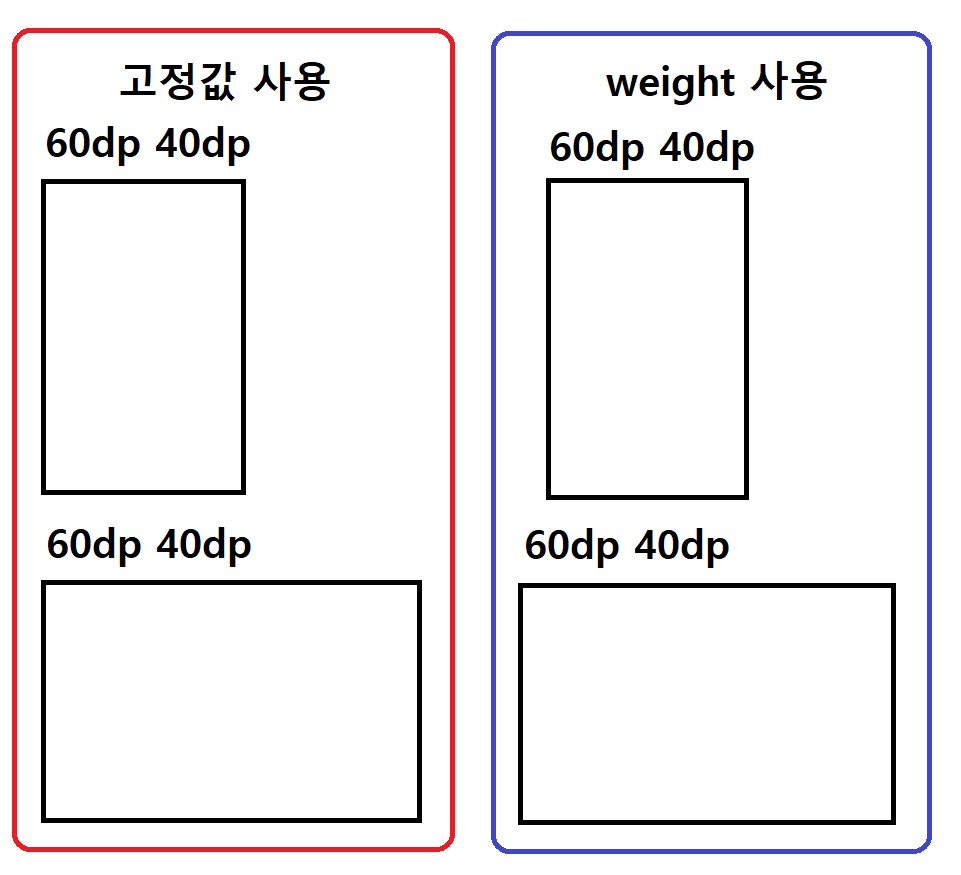
ImageView, textView 두 항목을 60dp, 40dp로 사용하였을 때 원래 화면이 넓다면
빈 공간이 생기지만 layout_weight를 1로 설정해 주면 화면에 맞게 설정이 됩니다.
activity_main.xml
<?xml version="1.0" encoding="utf-8"?>
<LinearLayout xmlns:android="http://schemas.android.com/apk/res/android"
    xmlns:app="http://schemas.android.com/apk/res-auto"
    xmlns:tools="http://schemas.android.com/tools"
    android:layout_width="match_parent"
    android:layout_height="match_parent"
    android:orientation="horizontal"
    tools:context=".MainActivity">

    <Button
        android:id="@+id/btn_start"
        android:layout_width="match_parent"
        android:layout_height="wrap_content"
        android:layout_weight="1"
        android:text="스레드 시작"/>

    <Button
        android:id="@+id/btn_stop"
        android:layout_width="match_parent"
        android:layout_height="wrap_content"
        android:layout_weight="1"
        android:text="스레드 종료"/>

</LinearLayout>
MainActivity.java
package com.example.threadexam;

import androidx.annotation.NonNull;
import androidx.appcompat.app.AppCompatActivity;

import android.os.Bundle;
import android.os.Handler;
import android.os.Message;
import android.view.View;
import android.widget.Button;
import android.widget.Toast;

public class MainActivity extends AppCompatActivity {

    Button btn_start, btn_stop;
    Thread thread;
    boolean isThread = false;


    @Override
    protected void onCreate(Bundle savedInstanceState) {
        super.onCreate(savedInstanceState);
        setContentView(R.layout.activity_main);


        // 스레드 시작
        btn_start = (Button) findViewById(R.id.btn_start);
        btn_start.setOnClickListener(new View.OnClickListener() {
            @Override
            public void onClick(View v) {

                isThread = true;
                thread = new Thread() {
                    public void run() {
                        while (isThread) { // thread가 true일 경우 계속 실행
                            try {
                                sleep(5000);//5000이 5초임
                            } catch (InterruptedException e) {
                                e.printStackTrace();
                            }
                            handler.sendEmptyMessage(0); //함수 msg로 0 보낸다.
                        }
                    }
                };
                thread.start(); //스레드 버튼 시작 클릭 했을 때 쓰레드 시작 됨.
            }
        });

        // 스레드 종료
        btn_stop = (Button) findViewById(R.id.btn_stop);
        btn_stop.setOnClickListener(new View.OnClickListener() {
            @Override
            public void onClick(View v) {
                isThread=false;
            }
        });
    }


    private Handler handler = new Handler() { //보통 handler랑 thread랑 같이 쓰임

        @Override
        public void handleMessage(@NonNull Message msg) { //Ctrl+o 해서 생성
            Toast.makeText(getApplicationContext(), "홍드로이드 강의", Toast.LENGTH_SHORT).show();
        }
    };

}handler.sendEmptyMessage(0); 안에 0 값을 주는 이유는 작업 구분을 하기 위함이다.
728x90
'[Android Studio] (Java)' 카테고리의 다른 글
| [Android Studio] (Service 백 그라운드 음악) (0) | 2023.08.28 |
|---|---|
| [Android Studio] (Dialog 다이얼로그 팝업창) (0) | 2023.08.28 |
| [Android Studio] (Log출력 및 주석 다는 법) (0) | 2023.08.27 |
| [Android Studio] (Fragment) (0) | 2023.08.27 |
| [Android Studio] (RecyclerView 수정 필요) (0) | 2023.08.27 |