728x90
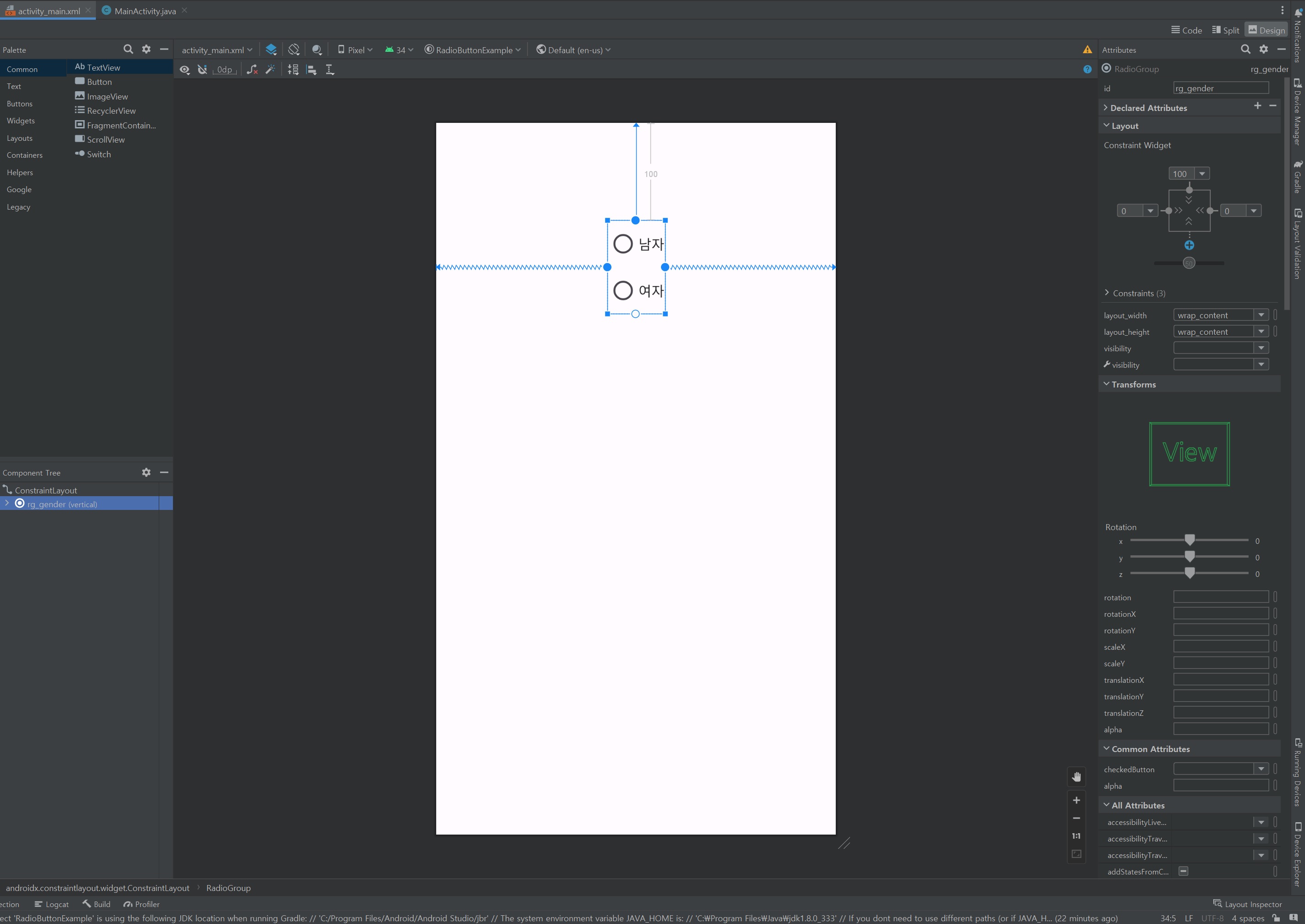
Radio Button. 동그라미 형으로 옵션 선택하는 것. ( ex) 5지 선다형 )
RadioGroup은 RadioButton을 감싸고 있는 그룹
RadioButton은 각각의 객체들
MainActivity.java
package com.example.radiobuttonexample;

import androidx.appcompat.app.AppCompatActivity;

import android.os.Bundle;
import android.widget.Button;
import android.widget.RadioButton;
import android.widget.RadioGroup;
import android.widget.Toast;

public class MainActivity extends AppCompatActivity {

    private RadioGroup rb_gender;
    private RadioButton rb_man, rb_woman;
    private Button btn_result;
    private String str_result; // 결과 값을 받아올 변수

    @Override
    protected void onCreate(Bundle savedInstanceState) {
        super.onCreate(savedInstanceState);
        setContentView(R.layout.activity_main);

        rb_gender = findViewById(R.id.rg_gender); // 라디오 버튼들을 담고있는 그룹
        rb_man = findViewById(R.id.rb_man); // 라디오 버튼
        rb_woman = findViewById(R.id.rb_woman); // 라디오 버튼
        btn_result=findViewById(R.id.btn_result); // 결과 값을 출력하라는 신호를 보낼 버튼

        rb_gender.setOnCheckedChangeListener(new RadioGroup.OnCheckedChangeListener() { // 라디오 버튼들의 상태 값의 변경됨을 감지.
            @Override
            public void onCheckedChanged(RadioGroup group, int checkedId) {
                if( checkedId == R.id.rb_man){
                    Toast.makeText(MainActivity.this, "남자 라디오 버튼", Toast.LENGTH_SHORT).show();
                } else if (checkedId == R.id.rb_woman){
                    Toast.makeText(MainActivity.this, "여자 라디오 버튼", Toast.LENGTH_SHORT).show();
                }
            }
        });
    }
}처음에 이렇게만 코딩하면 RadioButton만 눌러도 남자 라디오 버튼, 여자 라디오 버튼의 toast message가 출력된다.
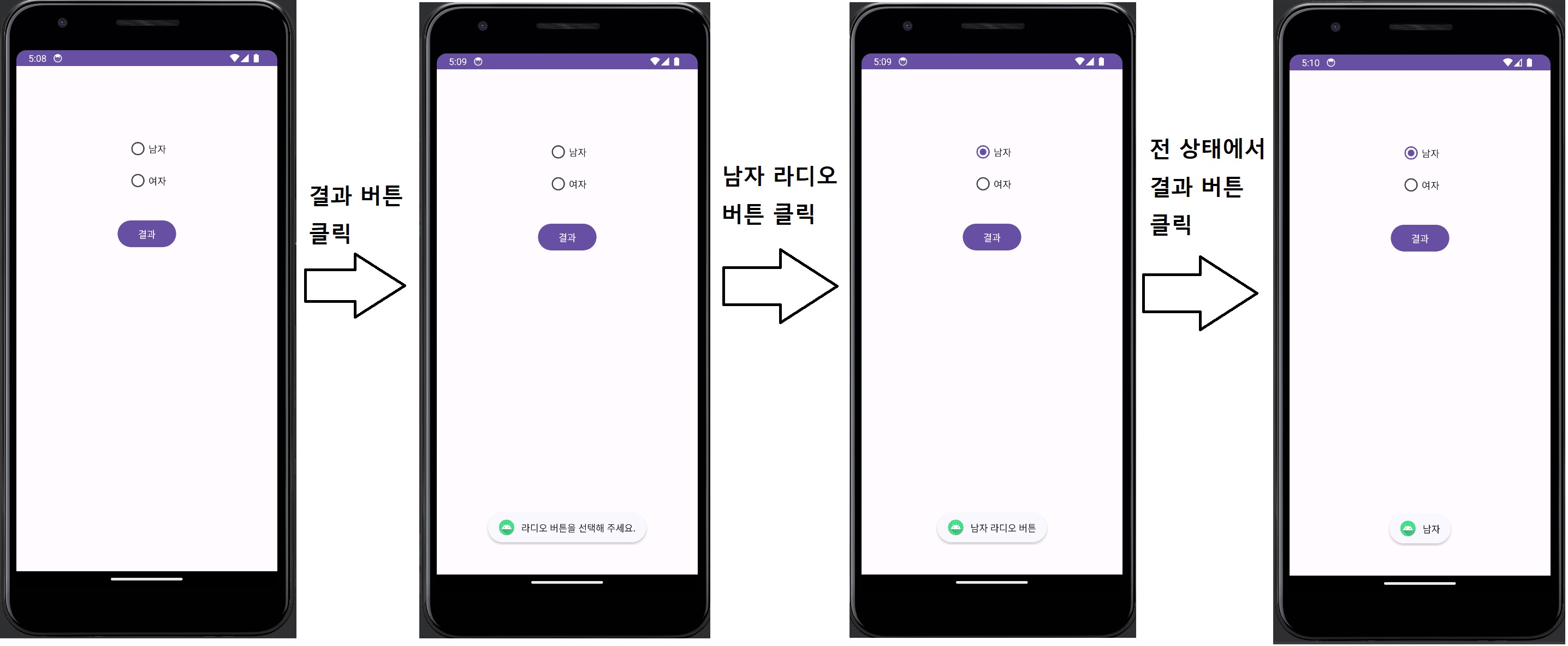
이것을 결과 버튼을 눌렀을 때 또 다른 문구가 뜨는 것으로 수정해 줄 것이다.
최종 코드
activity_main.xml
<?xml version="1.0" encoding="utf-8"?>
<androidx.constraintlayout.widget.ConstraintLayout xmlns:android="http://schemas.android.com/apk/res/android"
    xmlns:app="http://schemas.android.com/apk/res-auto"
    xmlns:tools="http://schemas.android.com/tools"
    android:layout_width="match_parent"
    android:layout_height="match_parent"
    tools:context=".MainActivity">

    <RadioGroup
        android:id="@+id/rg_gender"
        android:layout_width="wrap_content"
        android:layout_height="wrap_content"
        android:layout_marginTop="100dp"
        app:layout_constraintEnd_toEndOf="parent"
        app:layout_constraintStart_toStartOf="parent"
        app:layout_constraintTop_toTopOf="parent">

        <RadioButton
            android:id="@+id/rb_man"
            android:layout_width="match_parent"
            android:layout_height="wrap_content"
            android:text="남자" />

        <RadioButton
            android:id="@+id/rb_woman"
            android:layout_width="match_parent"
            android:layout_height="wrap_content"
            android:text="여자" />

    </RadioGroup>

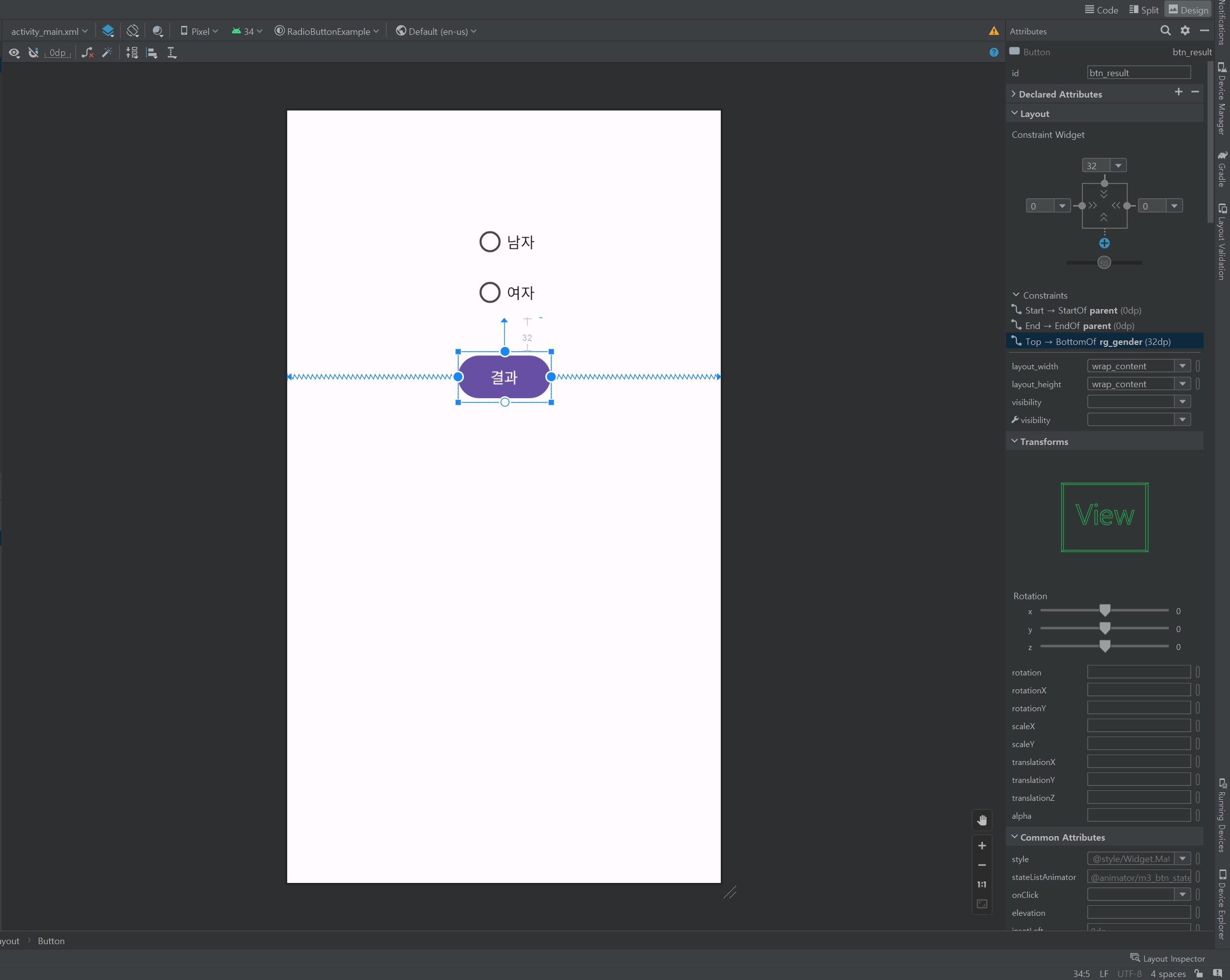
    <Button
        android:id="@+id/btn_result"
        android:layout_width="wrap_content"
        android:layout_height="wrap_content"
        android:layout_marginTop="32dp"
        android:text="결과"
        app:layout_constraintEnd_toEndOf="parent"
        app:layout_constraintStart_toStartOf="parent"
        app:layout_constraintTop_toBottomOf="@+id/rg_gender" />

</androidx.constraintlayout.widget.ConstraintLayout>MainActivity.java
package com.example.radiobuttonexample;

import androidx.appcompat.app.AppCompatActivity;

import android.os.Bundle;
import android.view.View;
import android.widget.Button;
import android.widget.RadioButton;
import android.widget.RadioGroup;
import android.widget.Toast;

public class MainActivity extends AppCompatActivity {

    private RadioGroup rb_gender;
    private RadioButton rb_man, rb_woman;
    private Button btn_result;
    private String str_result; // 결과 값을 받아올 변수

    @Override
    protected void onCreate(Bundle savedInstanceState) {
        super.onCreate(savedInstanceState);
        setContentView(R.layout.activity_main);

        rb_gender = findViewById(R.id.rg_gender); // 라디오 버튼들을 담고있는 그룹
        rb_man = findViewById(R.id.rb_man); // 라디오 버튼
        rb_woman = findViewById(R.id.rb_woman); // 라디오 버튼
        btn_result=findViewById(R.id.btn_result); // 결과 값을 출력하라는 신호를 보낼 버튼

        rb_gender.setOnCheckedChangeListener(new RadioGroup.OnCheckedChangeListener() { // 라디오 버튼들의 상태 값의 변경됨을 감지.
            @Override
            public void onCheckedChanged(RadioGroup group, int checkedId) {
                if( checkedId == R.id.rb_man){
                    Toast.makeText(MainActivity.this, "남자 라디오 버튼", Toast.LENGTH_SHORT).show();
                    str_result=rb_man.getText().toString(); // 라디오 버튼의 text 값을 String에 담아줌.
                } else if (checkedId == R.id.rb_woman){
                    Toast.makeText(MainActivity.this, "여자 라디오 버튼", Toast.LENGTH_SHORT).show();
                    str_result=rb_woman.getText().toString(); // 라디오 버튼의 text 값을 String에 담아줌.
                }
            }
        });

        btn_result.setOnClickListener(new View.OnClickListener() {
            @Override
            public void onClick(View v) {
                if (str_result != null) { // str result가 빈 값이 아니라면..
                    Toast.makeText(MainActivity.this, str_result, Toast.LENGTH_SHORT).show();
                } else { // str result가 빈 값일 경우
                    Toast.makeText(MainActivity.this, "라디오 버튼을 선택해 주세요.", Toast.LENGTH_SHORT).show();
                }
            }
        });
    }
}값을 받아오지 않으면 str result == null
728x90
'[Android Studio] (Java)' 카테고리의 다른 글
| [Android Studio] Card View (카드 뷰) (0) | 2023.09.02 |
|---|---|
| [Android Studio] Check Box (옵션 선택 버튼) (0) | 2023.09.02 |
| [Android Studio] ConstraintLayout (0) | 2023.09.01 |
| [Android Studio] 네트워크 상태 체크 (broadcastReciver) (0) | 2023.09.01 |
| [Android Studio] RelativeLayout (0) | 2023.09.01 |