728x90
다른 레이아웃들도 겹치기는 된다!
<FrameLayout이 없으면
ImageView가 전체를 다 차지해서 TextView가 보이지 않는다.
(ImageView 먼저 쓰고 TextView 먼저 썼을 시)
먼저 쓰는 항목 순서대로 Stack이 쌓인다고 생각하면 된다.
코드
<?xml version="1.0" encoding="utf-8"?>
<LinearLayout xmlns:android="http://schemas.android.com/apk/res/android"
    xmlns:app="http://schemas.android.com/apk/res-auto"
    xmlns:tools="http://schemas.android.com/tools"
    android:layout_width="match_parent"
    android:layout_height="match_parent"
    android:orientation="vertical"
    tools:context=".MainActivity">

    <FrameLayout
        android:layout_width="match_parent"
        android:layout_height="match_parent">

        <ImageView
            android:layout_width="match_parent"
            android:layout_height="match_parent"
            android:background="#000"
            android:src="@drawable/ic_launcher_foreground" />

        <TextView
            android:layout_width="wrap_content"
            android:layout_height="wrap_content"
            android:text="안녕하세요"
            android:textColor="#fff"
            android:textSize="34sp" />

        <TextView
            android:layout_width="wrap_content"
            android:layout_height="wrap_content"
            android:layout_gravity="bottom"
            android:textColor="#fff"
            android:textSize="40sp"
            android:text="hessepark"/>


    </FrameLayout>

</LinearLayout>결과
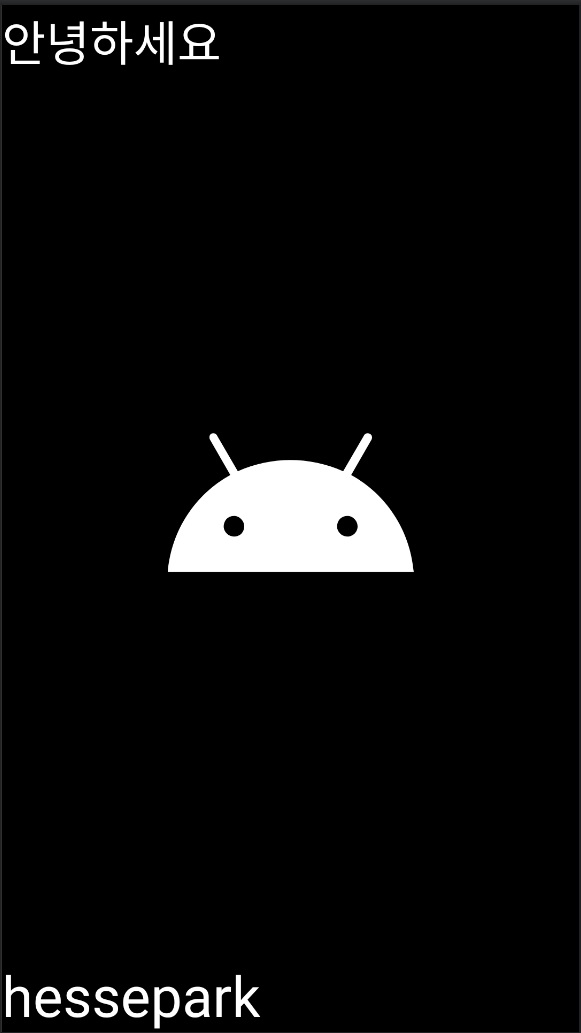
728x90
'[Android Studio] (Java)' 카테고리의 다른 글
| [Android studio] 생명 주기 (Life Cycle) (0) | 2023.09.03 |
|---|---|
| [Android Studio] View Binding (뷰 바인딩) (0) | 2023.09.03 |
| [Android Studio] Fragment 간 데이터 전송 (1) | 2023.09.03 |
| [Android Studio] Table Layout (엑셀 표 느낌) (0) | 2023.09.02 |
| [Android Studio] Card View (카드 뷰) (0) | 2023.09.02 |