728x90
EditText란 로그인할 때 아이디나 패스워드를 입력하게 되는데 입력을 하는 입력창이라고 보면 쉽다. (Input)
.xml
<EditText
    android:id="@+id/et_id"
    android:layout_width="300dp"
    android:layout_height="wrap_content"
    android:hint="아이디를 입력하세요..."/>
dp : cm 개념이라고 보면 된다.
wrap: 콘텐츠에 맞게 출력
** hint: 회색 입력창 (커서 가져다 대면 커서 뜨는) ex) 아이디를 입력해 주세요..
<Button
    android:id="@+id/btn_test"
    android:layout_width="wrap_content"
    android:layout_height="wrap_content"
android:text="버튼"/><Button 치자마자 자동완성
wrap_content도 추천에 뜬다. 바로 엔터
**id: id를 부여한 것
LinearLayout에 EditText와 Button을 만든 것이다.
이를 세로로 배치하고 싶을 시
android:orientation="vertical"
가로로 배치하고 싶을 시
android:orientation="horizontal"여기선 세로로 설정
결과

.java
EditText et_id;
Button btn_test;이렇게 변수 설정하는데 에러 뜰 시 import 안 됐을 가능성이 크다.
커서 대고 Alt+Enter->자동 import
@Override
protected void onCreate(Bundle savedInstanceState) {
    super.onCreate(savedInstanceState);
    setContentView(R.layout.activity_main);
}실행했을 때의 생명 주기
여기다 내용을 추가해야 한다.
et_id = findViewById(R.id.et_id);
btn_test=findViewById(R.id.btn_test);id 가져와서 속성 부여하기 (생명 불어넣기) .xml에 있는 id 들과 연결
btn_test.setOnClickListener(new View.OnClickListener() {
    @Override
    public void onClick(View v) {
        et_id.setText("홍드로이드님 감사합니다");
    }
});리스너 설정해서 버튼 클릭하면 동적으로 setText 내용 뜨게 하기
결과
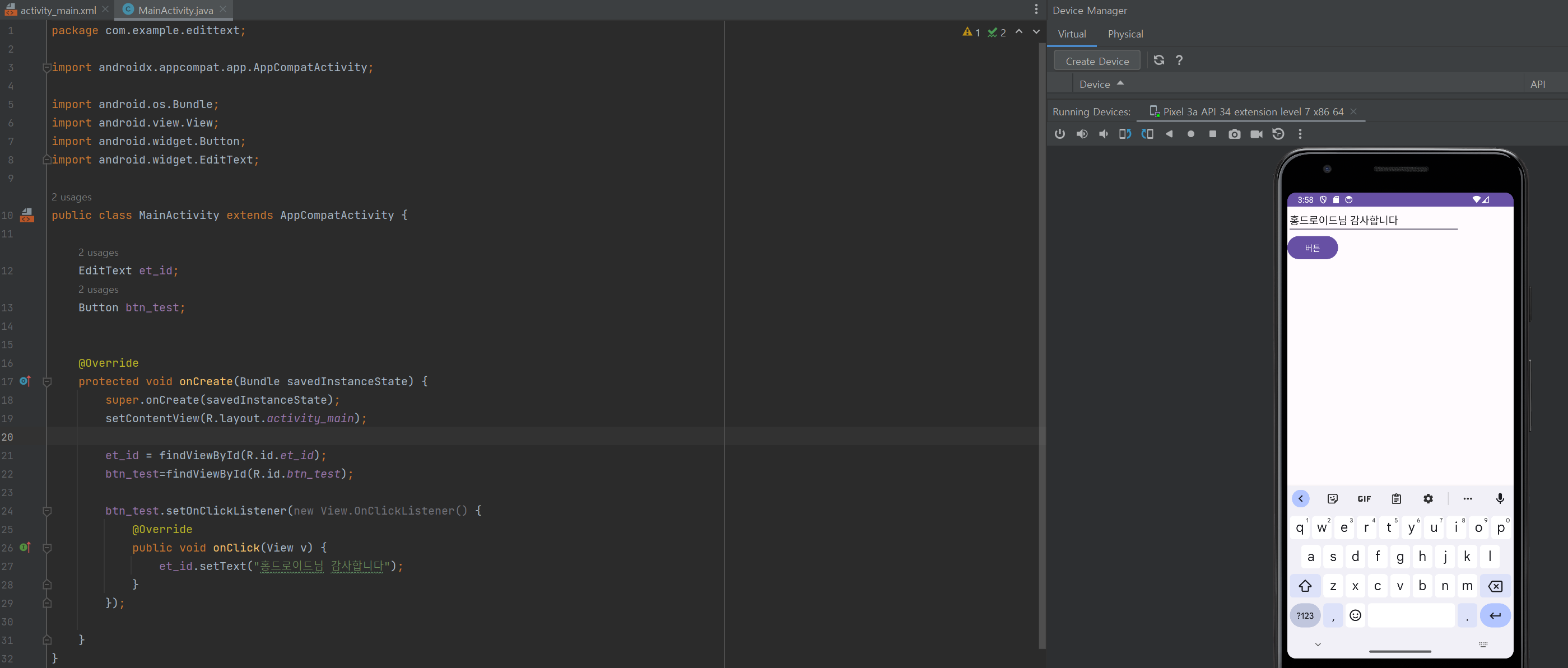
다른 내용들을 입력해도 setText가 잘 되는 것을 알 수 있다.
클릭하면 setText 설정한 내용으로 바뀜
728x90
'[Android Studio] (Java)' 카테고리의 다른 글
| [Android Studio] (ListView) (0) | 2023.08.24 |
|---|---|
| [Android Studio] (패키지 구조 & 역할) (0) | 2023.08.24 |
| [Android Studio] (ImageView & Toast) (0) | 2023.08.23 |
| [Android Studio] Intent 화면 전환 (0) | 2023.08.23 |
| [Android Studio] 프로젝트 생성 & TextView (0) | 2023.08.23 |